



AI-powered support and Ticket Management Software
Email supported and WhatsApp supported ticket management, with an AI agent that answers first. Every conversation lands in one shared queue, triaged and routed, with a suggested reply already waiting for your team.

- AI video agent answers first, in 23 languages
- Email and WhatsApp tickets in one shared queue
- Free plan, paid plans from $29 per month


Automation
How Ticket Management works
Most support software starts with a ticket form. Avarole starts with a conversation, so the questions that never needed a ticket are answered at once and the rest arrive complete.
- 1
The agent answers
The AI avatar greets visitors on your website or app and answers from your own knowledge base: policies, pricing, documents and FAQs. It searches your documents for each question instead of guessing, and points back to the source.
- 2
A ticket is raised when needed
When a visitor asks for a person or a follow-up, the agent raises a ticket during the call and gives the reference. Emails and WhatsApp messages become tickets too, the moment they arrive.
- 3
Your team resolves it
Tickets land in a shared queue with the transcript, the agent’s summary and a suggested reply. Your team replies, forwards, merges, splits, adds watchers and tracks time, with overdue tickets flagged.
Channels
Every channel lands in one queue
Email supported and WhatsApp supported ticket management, next to your AI video agent. Customers write the way they already do, and your team answers from one screen, with a label on each ticket showing how it arrived.
AI video agent
Customers talk to your agent on your website. Anything it cannot finish becomes a ticket with the transcript, the summary and a suggested reply attached.
Email
Give your agent an address on your own domain, such as support@yourbusiness.com. Every email becomes a ticket and the sender gets its number straight away.
WhatsApp
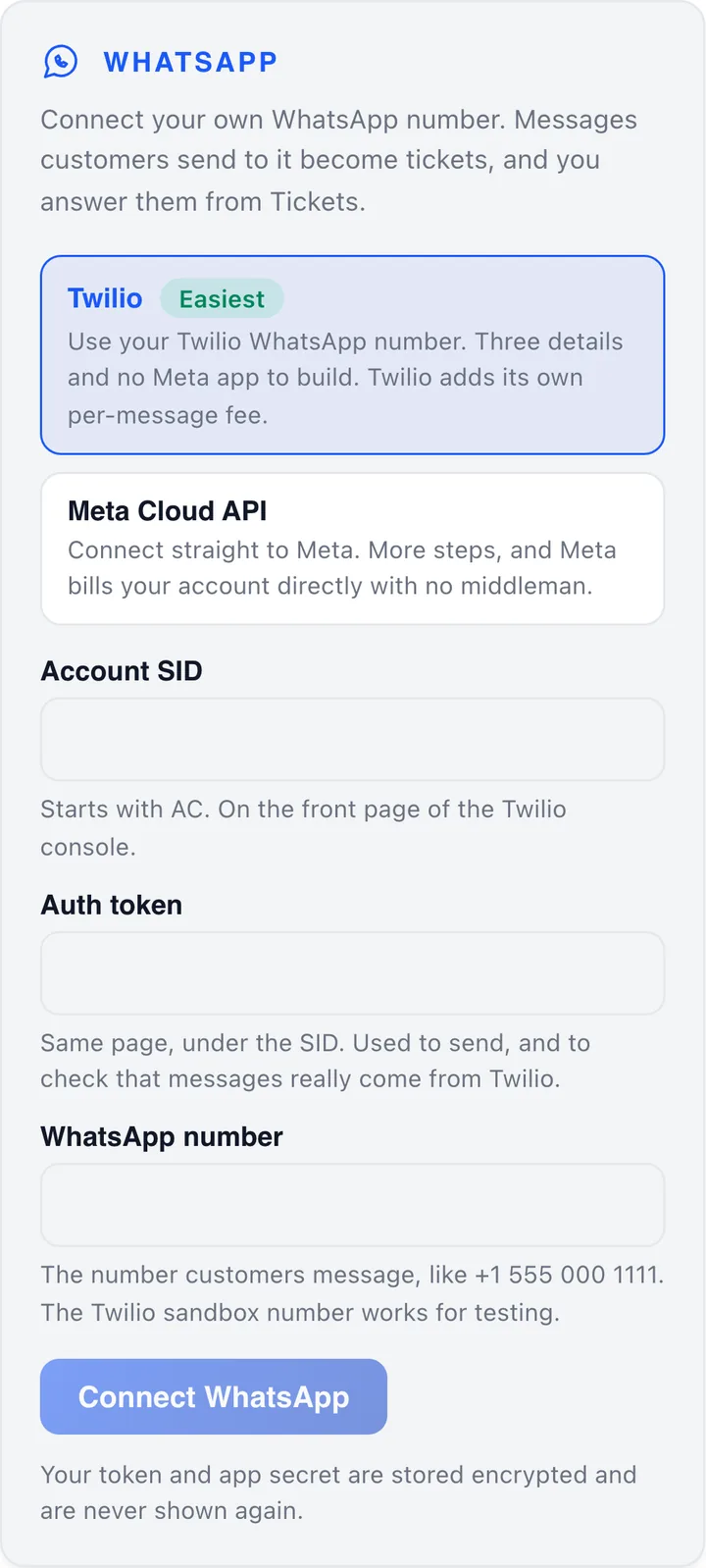
Connect your own WhatsApp number through Twilio or the Meta Cloud API. Each chat becomes a ticket and your team answers in the customer’s normal WhatsApp thread.


- 10 minto connect email: one DNS record on a domain you own
- 10 minto start with WhatsApp on Twilio, using its sandbox number
- 5of your own WhatsApp numbers can get alerts for tickets from any channel
- $0per-message fee from Avarole on email or WhatsApp
Email supported ticket management
Turn every email into a ticket. Your agent gets an address on your own domain, customers write to it from any mail program, and your team answers from the Tickets screen with a reply already drafted.
- Each email opens a ticket, triaged for priority and category, summarised, routed and given a service-level clock.
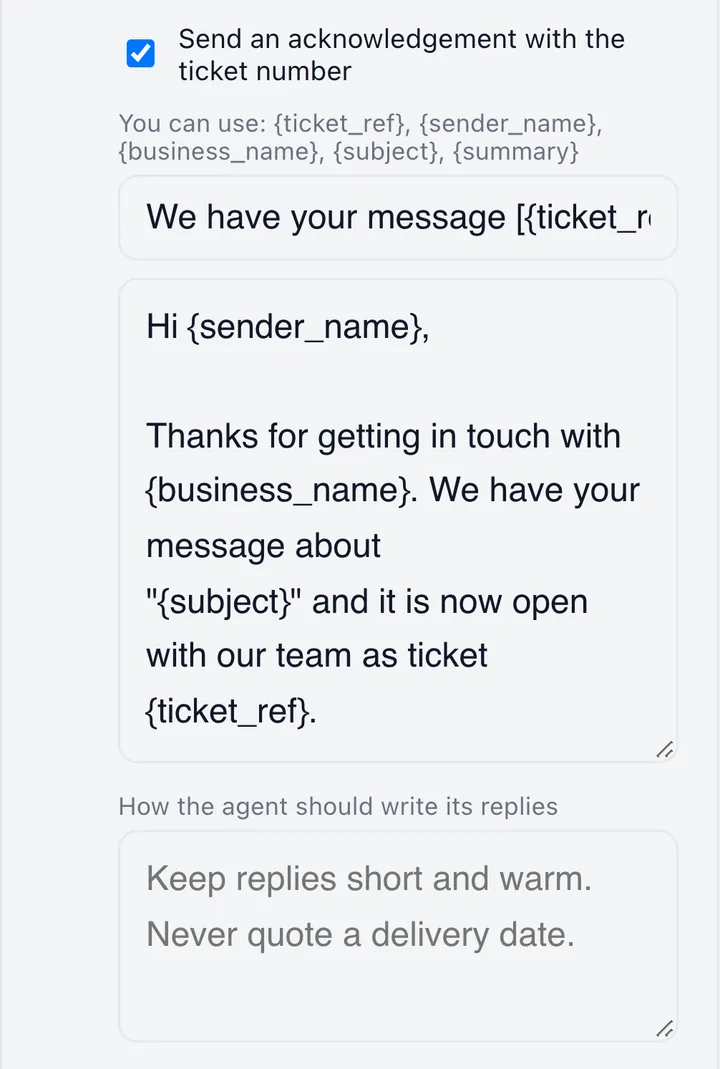
- The sender is told their ticket number at once, in your own wording, and their replies join the same thread.
- Your agent drafts a reply from your knowledge base. A person edits and sends it, so nothing goes out unapproved.
- Reply with formatting, Cc and Bcc, attachments, saved replies and a knowledge search, with a few seconds to undo.
- Resolve a ticket and the customer is emailed, and can rate the help with one click.
The flow
How an email becomes a ticket
From the customer pressing Send to your team seeing the ticket.
The customer emails you
From any email program. They do not need an account or a link.
Avarole receives it
Your MX record sends the mail to Avarole, which collects it about every two minutes, or at once when you press Check for new email now.
A ticket opens
A new subject opens a new ticket. A reply that carries the ticket reference, or the mail program’s threading, joins the ticket it belongs to.
The customer gets the number
The acknowledgement has the reference in its subject, for example We have your message [AV-100012].
Your team is told
The ticket appears in Tickets, and your agent’s suggested reply is already waiting on it.
Your team answers
From the ticket, in the same thread. The customer sees an ordinary email from your address.


Connect it
Live in about ten minutes
Ten minutes of your time, plus a short wait for DNS to update.
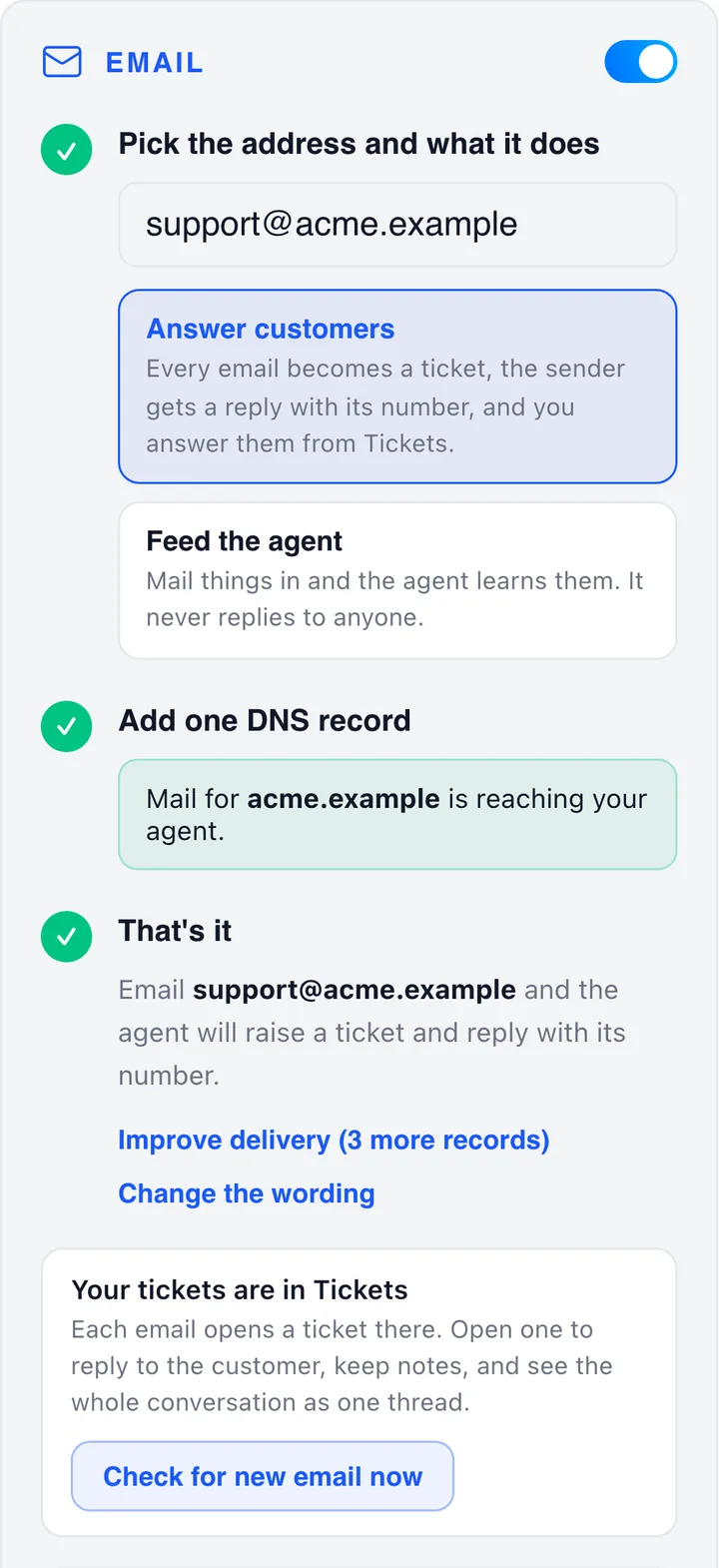
- 1Switch the Email card onIn Build, open your agent and turn on the switch at the top right of the Email card.
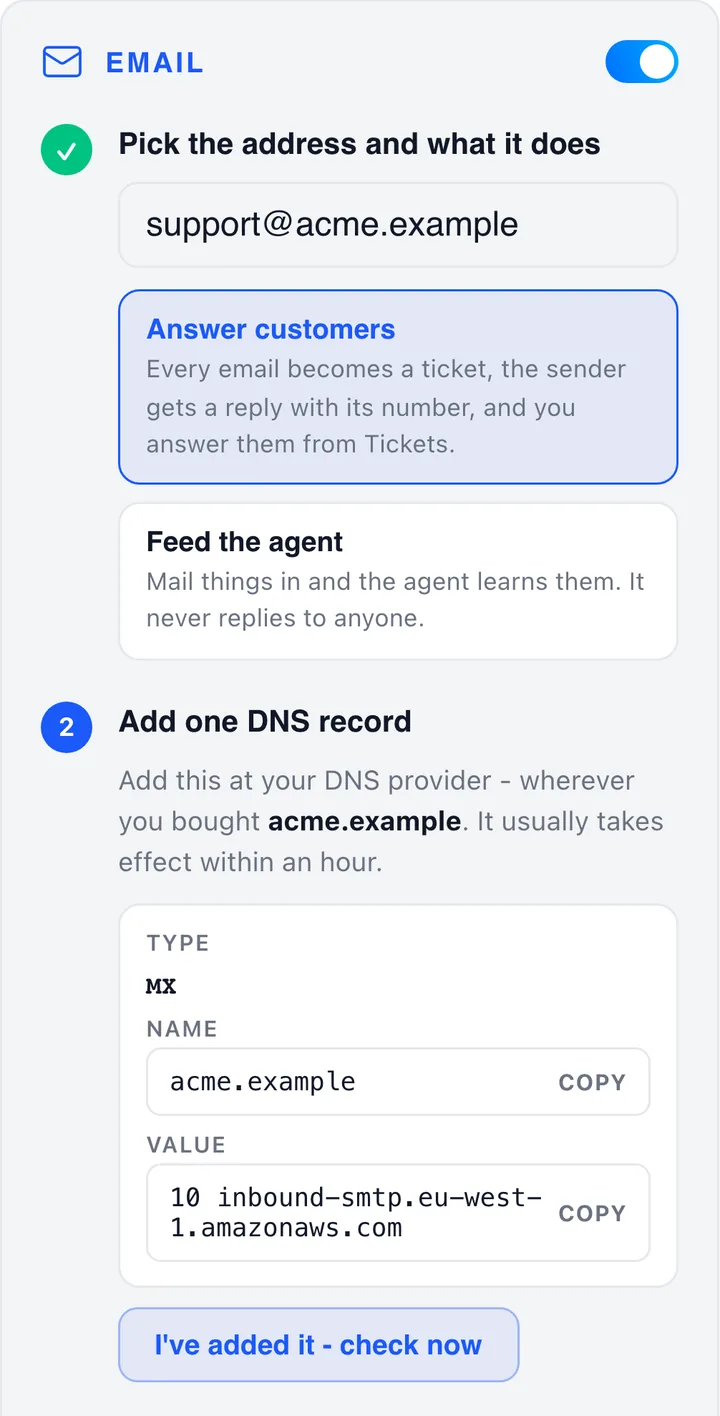
- 2Pick the address and what it doesType the full address. Choose Answer customers for a support address, or Feed the agent for one you write to yourself.
- 3Press Show me the recordThe card shows the MX record to add: its type, name and value, each with a copy button.
- 4Add it where your DNS livesGoDaddy, Namecheap, Cloudflare, Squarespace, Route 53 and similar. Priority 10, and the value exactly as shown.
- 5Press “I’ve added it, check now”DNS usually takes effect within an hour. The card turns green and says Mail for your domain is reaching your agent.
Your wording
Edit the acknowledgement with placeholders such as {ticket_ref}, {sender_name} and {business_name}, and tell the agent how to write: Keep replies short and warm. Never quote a delivery date.
Ticket rules
Set first-reply and resolve targets for each priority, close resolved tickets after 72 hours, remind a silent customer, choose a default group and share new tickets out evenly.
Teach your agent by email
Use a second address to feed the agent. Mail it notes, policies and price lists as PDF, text, markdown or CSV and it learns from them. It never replies and opens no tickets.
Customer portal
A web page where customers raise and follow requests without writing an email. Add a title and welcome line and share the link.
Notes, forward, split, merge
Keep private notes, forward a ticket to someone outside the team, split a second problem into its own ticket or merge duplicates.
One thread per ticket
A customer’s reply joins the same ticket and reopens it if it was Pending or Resolved, so the history stays in one place.


WhatsApp supported ticket management
Answer customers where they already chat. Customers message your business on WhatsApp. Avarole turns each conversation into a ticket, your team replies from Tickets, and your assistant can help.
- Every message becomes a ticket, or joins the customer’s open one, with the same triage, priority, routing and service-level clock as email.
- An instant acknowledgement with the ticket number, sent from your own number so it looks like you.
- Reply in plain text with pictures and documents. The customer sees it in their normal WhatsApp chat.
- Resolve in the chat: the customer is told and can rate the help, or type solved to close their own ticket.
- Pictures, voice notes and files are saved on the ticket. Mark spam and block that number for good.
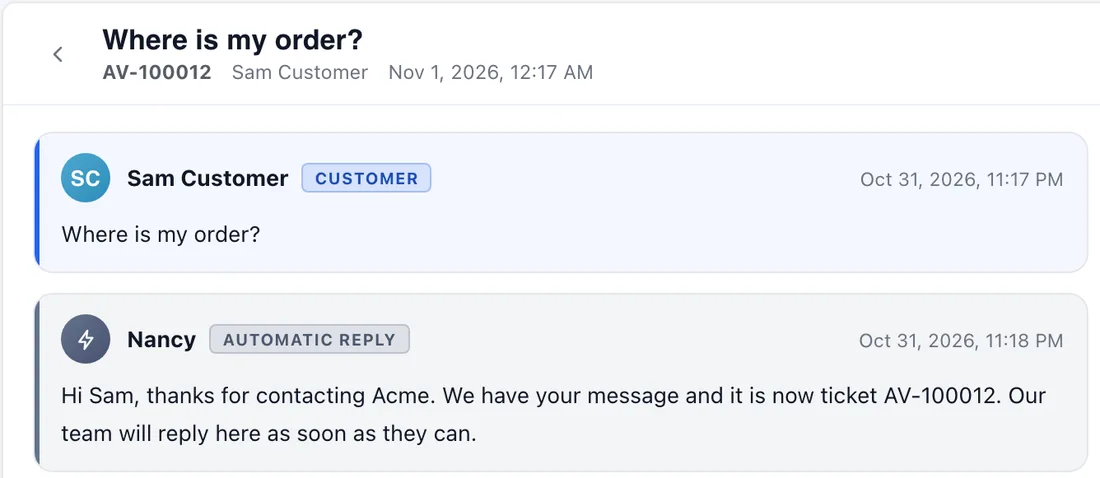
Where is my order?
Hi Sam, thanks for contacting Acme. We have your message and it is now ticket AV-100012.
Your order shipped today and should arrive on Friday.
solved
Glad that helped. Ticket AV-100012 is resolved. How did we do?
The flow
How a WhatsApp message becomes a ticket
The path a message takes, and the one WhatsApp rule worth knowing.
A customer messages you
They use the normal WhatsApp app. They do not need to install anything.
Your provider passes it on
WhatsApp hands it to Twilio or Meta, which sends it to your own Avarole webhook. Avarole checks it really came from your provider before doing anything.
A ticket opens or grows
A new ticket is triaged, routed and given a service-level clock, and your team is notified. A customer with an open ticket continues the same one.
The customer gets the number
The acknowledgement is sent from your own number, so it looks like you.
Your team or assistant replies
Answers appear in the customer’s WhatsApp chat. A resolved ticket tells the customer and asks how it went.


Two ways to connect WhatsApp
Twilio or the Meta Cloud API
Both reach the same place and give you the same features. They differ in effort, who you pay and what you need to own.
| Twilio, the easiest start | Meta Cloud API, direct | |
|---|---|---|
| Best for | Getting started in minutes, or if you already use Twilio | Going direct to Meta, with no middleman |
| You enter | Account SID, Auth token and your WhatsApp number (3 details) | Phone number ID, WhatsApp Business Account ID, access token and app secret (4 details) |
| Setup time | About 10 minutes. Webhooks are set up for you on a registered number | About an hour if your business is already verified, longer if not |
| Trying it out | Twilio sandbox: any phone that sends a join message can test straight away | Meta’s free test number, which can message only numbers you add and verify |
| Going live | Register your own WhatsApp sender in Twilio | Verify your business, add a payment method and publish your Meta app |
| Who bills the messages | Twilio, on your Twilio invoice, with its own per-message fee on top of WhatsApp’s charges | Meta, to the card on your WhatsApp account, with no fee from a middleman |
| Outside the 24 hours | A Twilio content template (enter its Content SID) | A template approved in WhatsApp Manager (enter its name) |
| Sending files | Pictures, audio and PDFs, up to 16 MB | Pictures and documents |
Your assistant
Let the assistant help, as much as you want
It answers from your own knowledge base, in a few short sentences written for a chat, and it never invents prices, dates or policies.
Off
Your team answers every message. This is the default, so nothing changes until you decide it should.
Suggest
The assistant writes a reply and holds it on the ticket. A person reviews it, edits if needed and sends it.
Answer
It sends the reply itself when it is confident. When it is not sure, it leaves a suggestion for your team instead.
Steps back on cue
The assistant stops as soon as a person replies on the ticket, or the customer types agent. They are told a person will reply and your team is notified.
Customer commands
A customer can type solved to close their own ticket, or agent to reach a person. Only the exact words work, so a sentence that merely contains one never does anything by accident.
Alerts on your own WhatsApp
Up to 5 of your numbers hear about new tickets, missed service targets and customer replies, for tickets from any channel, not just WhatsApp.
Meta’s terms bar general-purpose AI assistants from its business platform. A customer-support assistant that answers from your own business knowledge, like this one, is a normal use. Build that knowledge once in the Avarole knowledge base.
Private by design
Built so one customer can never see another
Secrets stay secret
Your token and secrets are encrypted before they are stored and are never shown again.
Your own webhook
Each account has its own webhook address with a long random key, so one customer’s address cannot receive another’s messages.
Every message is checked
Twilio signs with your Auth token and Meta with your app secret. A message that fails the check is rejected and creates nothing.
Only your number counts
A message addressed to any other number on your webhook is ignored.
Your costs stay with you
Avarole never holds your WhatsApp balance. Your provider bills you directly.
Disconnect any time
Press Disconnect and everything stops. Your existing tickets and conversations are kept, and connecting again brings new messages back.

Side by side
Same help desk, whichever channel
Choose one channel or run both. Each agent connects to one email address and one WhatsApp number, and both land in the same Tickets screen.
| How it starts | A customer emails your address | A customer messages your WhatsApp number |
|---|---|---|
| Set up with | One MX record on a domain you own | Twilio (3 details) or the Meta Cloud API (4 details) |
| Acknowledgement | Ticket number in the subject, in your own wording | Ticket number sent from your own number |
| Suggested reply | Drafted by your agent, sent by a person | Assistant set to Off, Suggest or Answer |
| Replying | Formatting, Cc and Bcc, attachments, saved replies, knowledge search, signature | Plain text with pictures and documents |
| Resolving | The customer is emailed and can rate the help with one click | The customer is told in the chat, can rate, or can type solved |
| Files from customers | Kept on the ticket. Files over 10 MB are skipped | Kept on the ticket. Files over 10 MB are skipped. Voice notes are saved, not transcribed |
| Files from your team | Up to 10 files, 20 MB in all, per reply | Up to 10 files, 20 MB in all, per reply, within what WhatsApp accepts |
| Plan allowance | Counts towards your monthly allowance | Counts towards the same monthly allowance |
| Limit | One address per agent, on a domain you control | One number per agent |
Free email providers such as gmail.com, outlook.com, yahoo.com and icloud.com cannot be connected, because nobody else can add a DNS record to them. Use an address on your own domain. A WhatsApp number belongs to one agent only.
Setup guides
Take the full guides with you
Step-by-step PDFs for your administrator or IT team: every setting, limit and fix, with the app’s own screens. Free to download, no sign-up.
Email setup guide
PDF · 10 pages · 1.2 MB
Give your agent an address on your own domain, turn every email into a ticket and answer from one place.
- What email gives your team
- Connecting your address, step by step
- Acknowledgements, replies and ticket rules
- Teaching your agent by email
- Limits, problems and fixes
WhatsApp setup guide
PDF · 15 pages · 1.7 MB
Both ways to connect, Twilio and the Meta Cloud API, and what WhatsApp does for your team once it is connected.
WhatsApp- What WhatsApp gives your team
- Twilio: the easiest way to start
- Meta Cloud API: direct from Meta
- Alerts, the assistant and customer commands
- Costs, limits, security and fixes
Why Avarole
Affordable help desk software for email and WhatsApp
A shared inbox, email and WhatsApp tickets, service-level targets and an AI agent that answers first, at a price a small team can start with.
Affordable by design
Start on the free plan, then move to paid plans from $29 per month. Avarole takes no per-message fee on email or WhatsApp. See the plans on the pricing page.
Live in minutes
Connect email with one DNS record and WhatsApp through Twilio in about ten minutes, with free step-by-step PDF guides.
AI answers first
Your AI video agent settles common questions before a ticket exists, so your team spends its time on the ones that need a person.
One shared inbox
Email, WhatsApp and call tickets share one queue, one set of customer records, service-level targets and reports.


Compare the plans on the Avarole pricing page, meet the Avarole Agent that answers first, or see how it connects to your CRM and tools.
Support structure
Ticket management features
Everything a support team expects from a ticketing system, behind one login.
Shared ticket queue
One queue for the whole team, with ready-made views such as Needs your reply, Waiting on customer and Overdue, saved lists, a board by status and search across names, subjects and messages.
Bulk actions and shortcuts
Select many tickets to change status or priority in one step, and move through the queue from the keyboard.
Customer records
Contacts and companies are stored with their tickets, and anyone writing from a company’s email domain joins it automatically, so every reply has context.
Replies with attachments
Answer with files (up to 10 per reply, 10 MB each), keep private notes your customer never sees, forward a ticket, merge duplicates and split a ticket that covers two issues.
Saved replies and knowledge
Drop a saved reply or an answer from your knowledge base into the reply box, so every agent gives the same, approved answer.
Tickets from email
Give your agent an address on your own domain. Each email becomes a ticket, and replies drafted by the AI wait for your team to approve them.
Tickets from WhatsApp
Connect your number through Twilio or the Meta Cloud API. Each chat becomes a ticket and your team answers in the customer’s WhatsApp thread.
Tickets from calls
Each call ticket carries the agent’s summary, the details captured on the call and a suggested reply, so nobody has to listen again.
Watchers
Let colleagues follow a ticket and get a notification for every change, without taking it over.
Time tracking
Record the time spent on a ticket, mark it billable and see where support effort goes.
Service-level targets
Set first-response and resolution targets. A ticket past its time lands in the Overdue list and raises an alert.
Groups and automation
Teams own tickets and share work out in turn, least loaded first. Automatic rules act when a ticket is created, updated or goes quiet, and scenarios apply a set of actions in one click.
Reports and satisfaction
First response, resolution, SLA performance, open ticket age and customer ratings, plus the questions your agent could not answer, so you know what to teach it next.


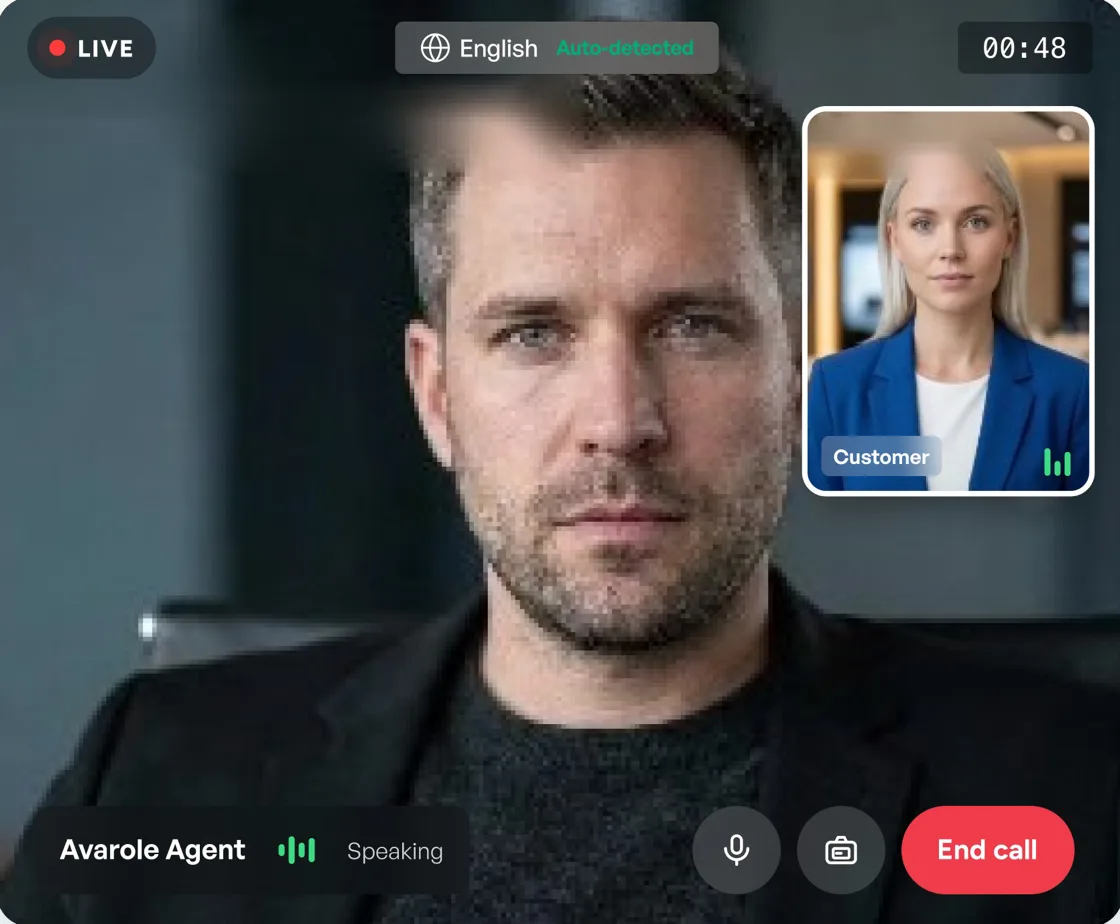
See agent in action
Customer service automation that still feels human
- Answers are grounded in the documents you upload, and point back to the source.
- The avatar speaks 23 languages and switches when the customer does.
- Human handoff (Professional and AI Team plans) keeps the conversation, details and ticket together.
- Every conversation gets a transcript, and paid plans add lead capture, so nothing is lost.
- On Professional and AI Team plans the agent can look up the customer in your connected CRM mid-call.
Use cases
Who uses Ticket Management
Teams that want faster first answers without hiring a night shift.
E-commerce and retail
Order questions, product advice and returns, answered at any hour, with a ticket for anything that needs a person.
Banking and insurance
Explain services online, then hand complex cases to a person with the customer’s details already attached.
Healthcare and clinics
Answer patient questions, route requests to reception and keep the conversation with the ticket.
SaaS and agencies
Onboarding help and technical questions, with a ticket for engineering when a person must look.


FAQs
Ticket Management
questions

Still have a question?
Ask our AI avatar face to face, in your language. It answers right away.
What is Ticket Management?

Ticket Management with Avarole is customer support software where an AI agent answers customers first and a ticketing system tracks everything that needs a person. The AI video agent talks to customers on your website, raises a ticket when it cannot finish the job, and your team works one shared queue with the full conversation attached.
Can tickets be created from email and WhatsApp?
Yes, both. Give your agent an address on your own domain, such as support@yourbusiness.com, and every email becomes a ticket. Or connect your own WhatsApp number through Twilio or the Meta Cloud API and every chat becomes one. Both land in the same shared queue with a suggested reply drafted from your knowledge base, and your team approves it before it is sent. Free email and WhatsApp setup guides (PDF) are on this page.
Does the AI reply to customers on its own?
By email, never: the agent drafts a suggested reply and your team sends it, so customers only hear from a person, apart from the acknowledgement and the resolved email. On WhatsApp you choose: Off (the default), Suggest, where a person approves each reply, or Answer, where it replies itself when it is confident and leaves a suggestion when it is not. It stops the moment a person replies or the customer types agent.
Is Avarole affordable ticket management for a small team?
Yes. Avarole is built to be affordable help desk software for small teams: there is a free plan and paid plans start at $29 per month (Business $59, Professional $499, AI Team $1,699). It includes a shared queue, email and WhatsApp tickets, service-level targets, customer records, reports and an AI video agent that answers first, and Avarole takes no per-message fee on email or WhatsApp. WhatsApp messages are billed by your provider at its own rates.
GET STARTED
Set up your Ticket Management.
Start free, connect your knowledge base and let the agent answer the first question.
- 1
Sign up
Create your account and get your agent ID.
- 2
Connect
Add the website widget, the mobile SDK or the API.
- 3
Go live
Customers talk to your agent face to face, in their language.