


AI Executive Assistant: Your Business Assistant, Right on Your Desktop
Avarole Executive reads your inbox, briefs you before meetings and answers from your own documents, right on your Windows or macOS desktop. You review every draft before anything is sent.

What it does for you
A chief of staff for the work you repeat every day.
Avarole Executive takes the first pass on the routine load around a leader, so your time goes to decisions. It runs on your Windows or macOS desktop and drafts everything for your approval.
Triage your inbox
Finds the urgent threads, summarises long chains and drafts replies for you to edit and send.
Prepare you for meetings
Summarises the brief and lists the decisions needed, from your calendar, email and documents. A Meeting Advisor avatar can also join live meetings, advisory only.
Answer from your documents
Ask across briefs, contracts and policies. Every answer points back to the file it came from.
Explain your numbers
Ask about a spreadsheet or report and get the trend, its likely drivers and a plain summary.
Turn notes into actions
Hand over rough meeting notes and get back who owns what and the next steps.
Keep your calendar honest
Schedule and meeting reminders connected to your calendar, so nothing important slips past.
Book meetings by voice
Check a short form and Avarole books the meeting, confirms it out loud and sends the invitation.
Check current facts
Point it at the websites you rely on and it reads them when you need up-to-date information.
Share files safely
Keep files in a shared Vault for your assistant and send them with secure links that expire or can be switched off.


Get started
Download the app, sign up and subscribe.
Install Avarole Executive on your computer, create your account, then choose an individual or team subscription.
- 1
Download the app
Install Avarole Executive on Windows or macOS.
- 2
Sign up
Create your account and connect the sources you choose.
- 3
Subscribe
Pick an individual or team subscription and start working.
Windows
Windows 10 and 11
macOS
Apple silicon and Intel
After installing, sign up inside the app, or talk to our AI avatar to choose a plan & subscribe.
Inside the app
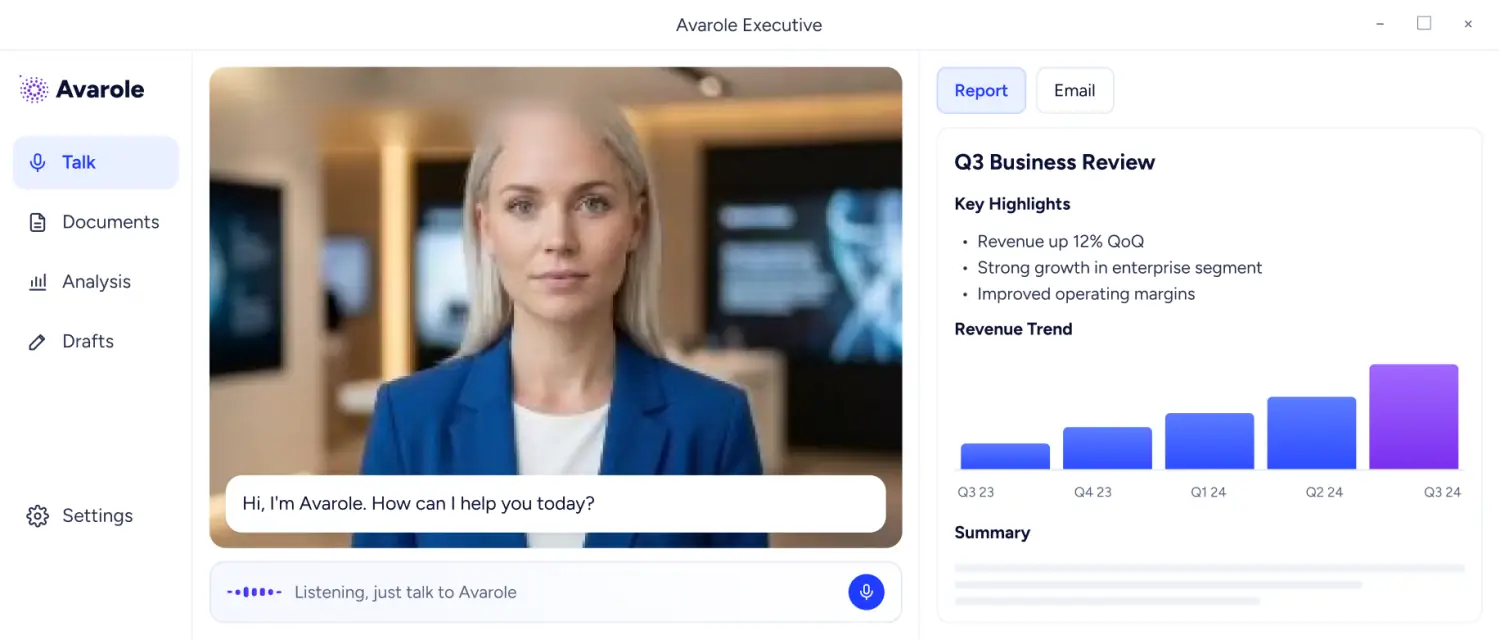
Conversation, Documents, Analysis and Drafts.
A day with your AI chief of staff
Start the morning with urgent messages sorted and replies drafted. Ask for the brief before each meeting, ask a question about a contract between calls, and review the drafts at the end of the day.
Connected information
Connect the sources you choose.
Executive only reads what you connect. Add your email, calendar, documents and spreadsheets, then ask questions across all of them in one conversation.
- Answers point back to the file or message they came from
- Remove a source at any time
- Only reads the sources you connect
Email
Urgent threads, draft replies
Calendar
Meeting briefs and prep
Documents
Briefs, contracts, policies
Spreadsheets
Excel trends and drivers
Meeting notes
Owners and next steps
Business systems
Available on request
You stay in control
Nothing is sent until you say so.
Review before send
Every email and document is a draft until you approve it.
Private by design
Encrypted connections, and access only to the sources you connect. Mailbox passwords are stored once and never read back out.
Runs on your desktop
Native apps for Windows and macOS. Talk in your own language and it answers face to face.
Team subscriptions
Add your leadership team and manage users in one place, with administration and access controls on Enterprise.
Plans
Start with a free trial, then subscribe per user.
Compare voice minutes, AI credits, email accounts, knowledge storage and support for every plan, from the trial to Enterprise.
FAQs
About
Avarole Executive

Still have a question?
Ask our AI avatar face to face, in your language. It answers right away.

What is an AI executive assistant for a CEO?

Software that carries the routine load around a leader: reading and prioritising email, drafting replies, preparing for meetings, booking time and answering questions from the leader’s own documents. Avarole Executive does this on your Windows or macOS desktop, and you review everything before it goes out.
Can the AI assistant send email for me?
It drafts replies for you to review, and nothing is sent until you approve it. Executive Pro can send automated replies with your approval, and Enterprise adds approval rules you configure.
What information can it use?
Only the sources you connect: email, calendar, documents, spreadsheets and meeting notes, plus websites you choose to point it at. Connections are encrypted and access ends the moment you remove a source. Business systems are available on request.
What does the free trial include?
A one-time allowance of 30 minutes of voice conversation and 50 AI processing credits on your own desktop, with one email account, one calendar and 25 MB of business knowledge. Subscriptions are per user per month, and the Pricing page compares every plan.
Get started
Get started with Avarole Executive.
Download the app, connect the sources you choose and approve each draft. Subscribe per user when you are ready.
- 1
Download
Install Avarole Executive on Windows or macOS and start the free trial.
- 2
Connect
Connect the email, calendar and documents you choose.
- 3
Approve
Review every draft. Nothing is sent until you approve it.