
Products

Explore live avatars
How it Works?PricingContact Us
A customer talking face to face with an Avarole AI avatar on a website
Avarole Agent

AI Video Agent: A Digital Employee for Every Customer Conversation

Add a face-to-face agentic AI avatar to your website or app. Answer questions and guide customers in their language.

  • Website widget
  • Mobile SDK
  • API
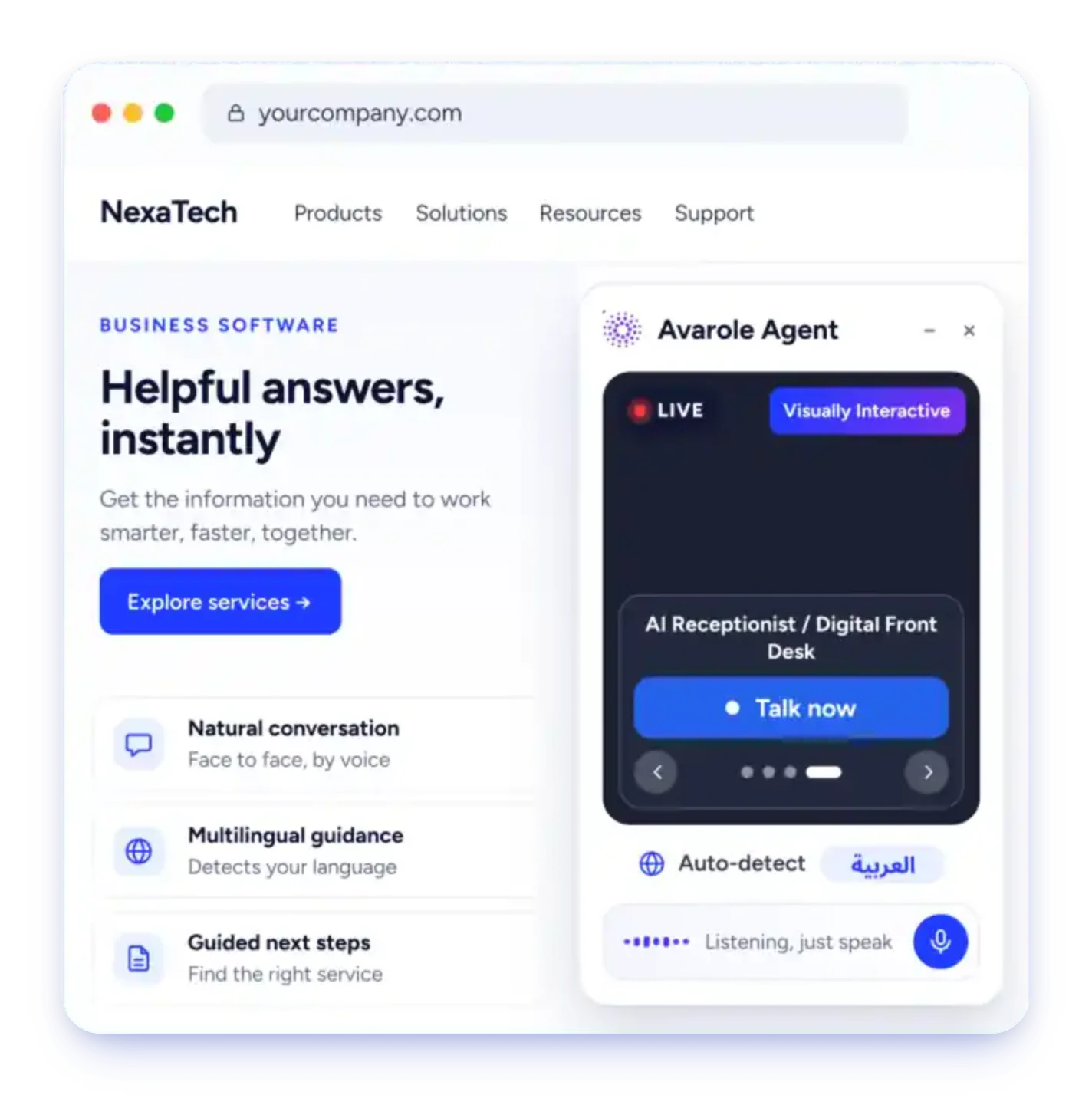
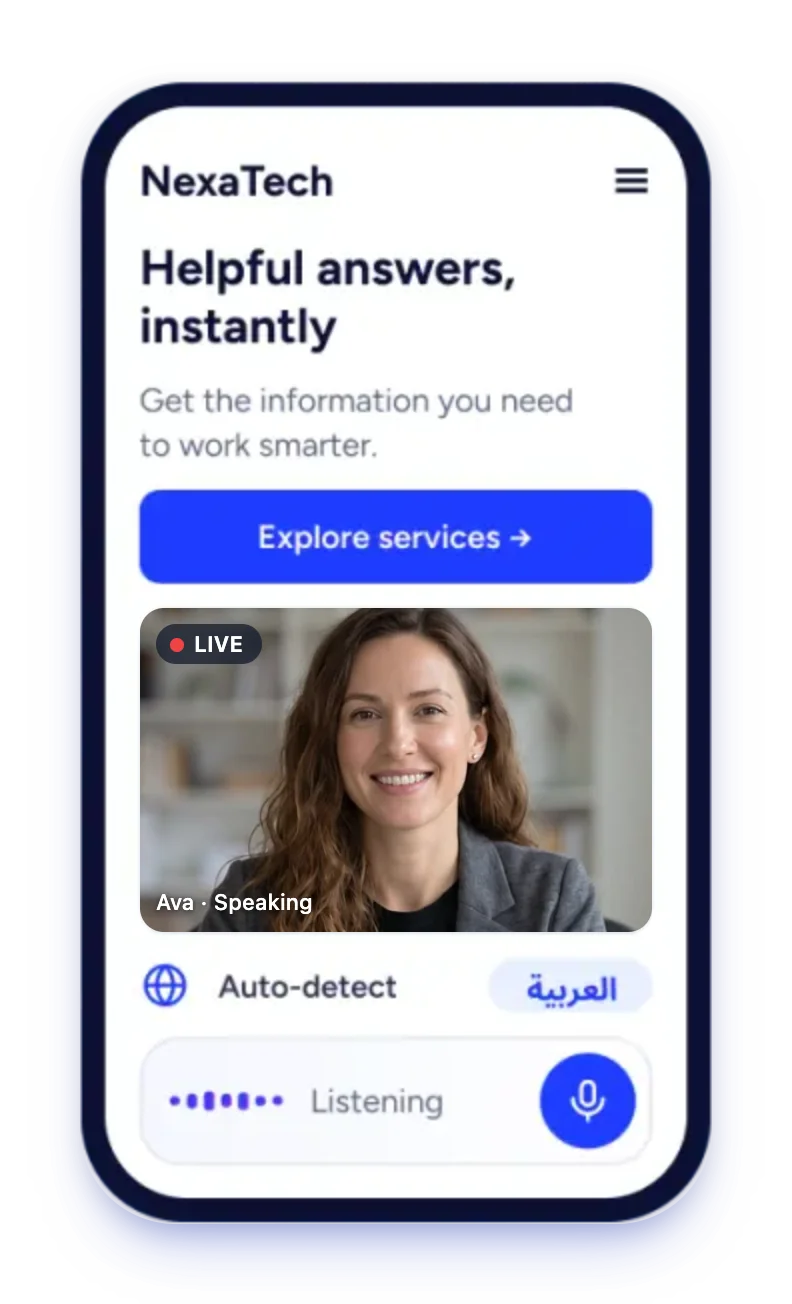
Avarole Agent widget embedded on a company websiteAvarole Agent on a mobile site, with a live avatar answering the visitorEmbedded On Your Website

Get started

Sign up, connect
and go live.

Create your account, choose where customers will meet your agent and connect it with the website widget, the mobile SDK or the API.

  1. 1

    Sign up

    Create your account and get your agent ID.

  2. 2

    Connect

    Add the website widget, the mobile SDK or the API.

  3. 3

    Go live

    Customers talk to your agent face to face, in their language.

Agentic AI avatar

More than a talking head. It does the work.

An agentic avatar works out what the visitor needs, uses what it knows, takes the next step and knows when to hand over to a person.

  • It listens and speaks

    Real-time voice conversation with a natural face, a matching voice and lip-sync, so visitors talk instead of typing.

  • It answers from your knowledge

    It searches your documents, FAQs and policies for each question instead of guessing, and its answers point back to the source.

  • It takes action

    It captures a lead, raises a support ticket, recommends the next step or walks the visitor to the right section of your site with Site Navigation.

  • It knows when to hand off

    Human handoff (Professional and AI Team plans) passes the conversation, the customer’s details and the ticket to your team.

  • It can see

    When a visitor turns on their camera, it can look at what they hold up, such as a product label, a document or an error screen.

  • It looks the part

    Pick a ready-made avatar from the library or create your own from a text description, with the voice and persona you choose.

Guardrails

You stay in control.

Capable, but never unsupervised.

  • Only what you allow

    It uses only the abilities you give it: your knowledge base, tickets, lead capture and handoff.

  • Asks before it acts

    Site Navigation checks with the visitor first, before anything that buys, pays, deletes or submits.

  • Every call on record

    Every conversation gets a transcript your team can review whenever they need it.

Built into every Avarole Agent

Talk, guide, resolve and learn, all in one agent.

Your agent answers customers face to face, walks them to the right page, turns every unfinished request into a ticket and shows you where visitors get stuck.

The Avarole ticket queue showing customer tickets with status, priority and a short summary of each request
Ticket Management

Every request arrives complete.

The agent answers first, in 23 languages. When a person is needed it raises a ticket with the conversation attached, so your team resolves it from one shared queue.

  • Shared queue with saved views and bulk actions
  • Tickets from the AI agent, email and WhatsApp
  • Replies, forwarding and watchers, customer records and reports
Explore Ticket Management
The Avarole Page Insights screen with visit totals, a visitor funnel, pages people leave from, where they struggle and what the agent did on the page
Avarole Insights

See where visitors drop off, and why.

See the pages people leave from, the moments they struggle, and what your agent did to help. Fix what loses customers and keep what wins them.

  • A funnel for the steps you choose
  • Rage clicks, dead clicks and abandoned forms, tied to the page
  • How many visitors open the agent and start a call, privacy first
Explore Avarole Insights

Feature · Call Analysis

Know how every call went, without listening to it.

Every conversation your agent has becomes a line you can scan: who called, how long it ran, what it was about, how it felt and what to do next.

  • Read any call in seconds

    Every call shows how long it ran, and shortly after it ends Avarole writes a short summary of what was asked and what happened.

  • See the mood of every call

    Calls are marked positive, neutral or negative from their summary. Spot unhappy callers first, or tap a sentiment to see only those calls.

  • Let callers rate the call

    Turn on Call feedback and callers give a 1 to 5 star rating when the call ends. You get the average and the spread.

  • Never drop a follow-up

    The action items a conversation produced are listed under the call, so a promised callback or a request for a quote gets done.

The Call Analysis page of the Avarole app: sessions, minutes talked, average length and plan minutes, the share of positive, neutral and negative calls, and the caller star ratings
The Call Analysis page in the Avarole app, on desktop and on a phone. Sample data.
A list of calls in the Avarole app with the agent, source, start time, duration, sentiment, caller rating and summary, and one call opened to show its full summary and follow-ups
Open any call to read its summary and follow-ups. Very short calls are not analysed. Sample data.

Feature · Email and WhatsApp tickets

Email and WhatsApp supported ticket management.

Customers do not only talk to your agent. They email you and message you on WhatsApp too, and every message lands in the same shared queue as your agent’s tickets, triaged, routed and ready for your team.

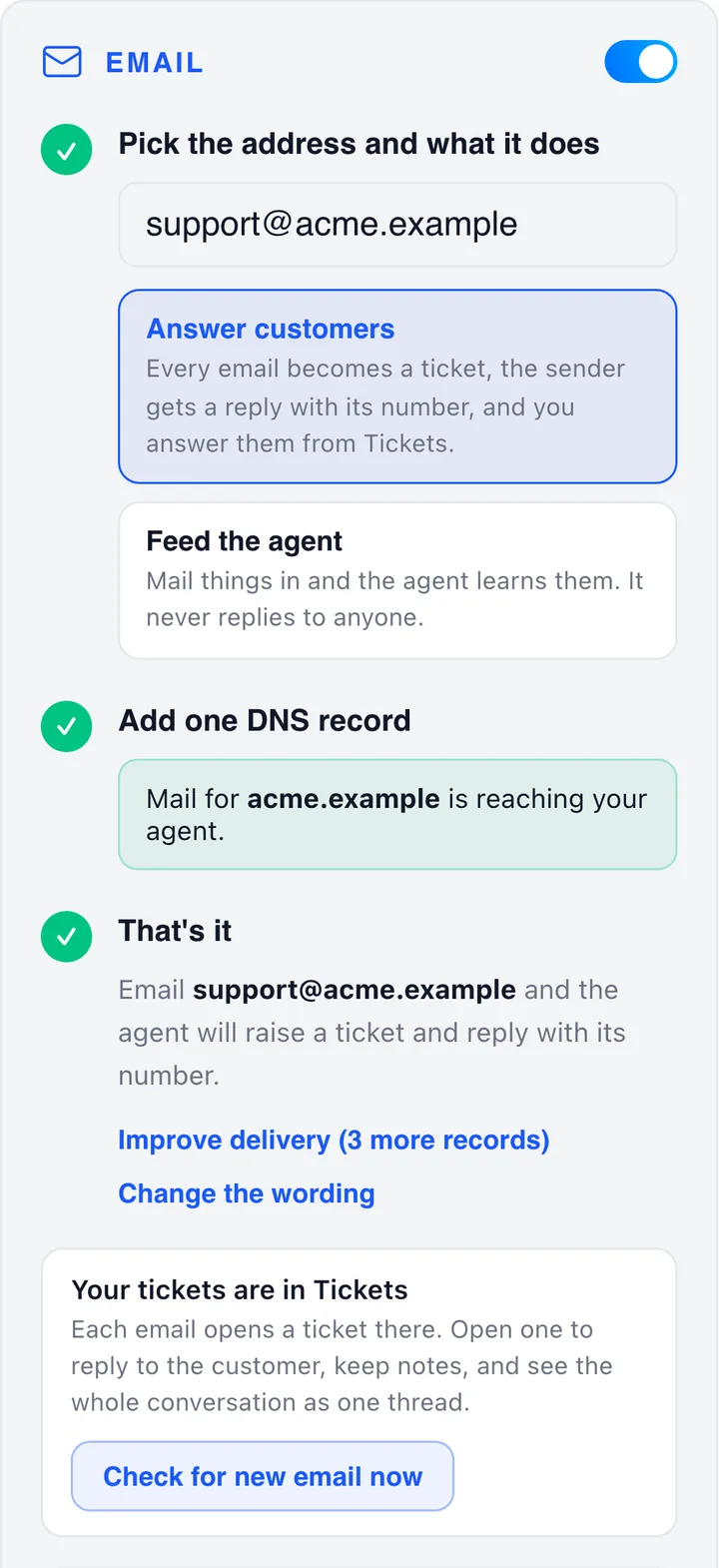
The Email card in the Avarole app once connected: green ticks and a message that mail for the domain is reaching the agent
Email

Every email becomes a ticket.

Give your agent an address on your own domain, add one DNS record and customers can email your team. The sender gets their ticket number at once.

  • Triaged, routed and on a service-level clock
  • A reply drafted from your knowledge base, sent only when a person approves it
  • Live in about ten minutes, on your own domain or a subdomain
Explore email tickets
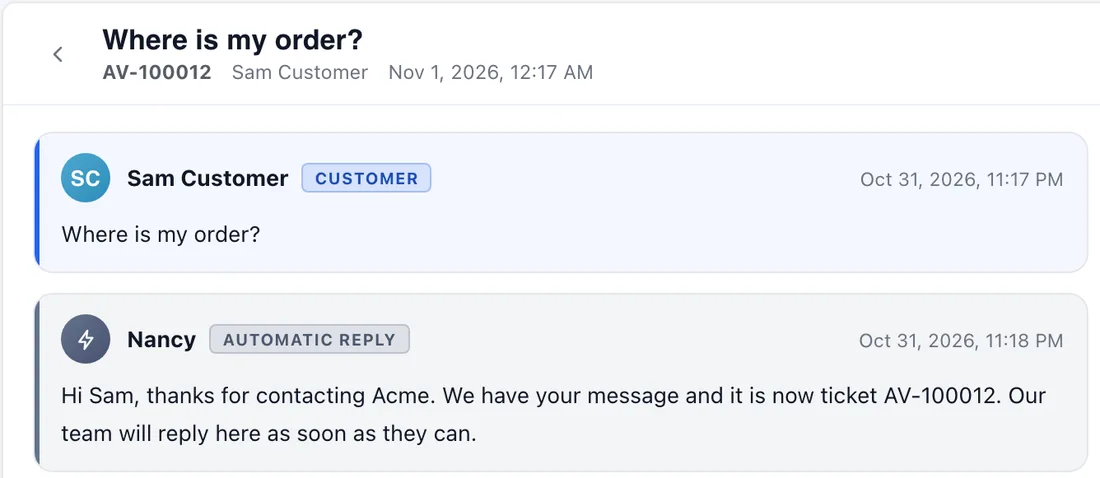
A WhatsApp ticket in the Avarole app: the customer’s message and the automatic reply with the ticket number
WhatsApp

Answer where customers already chat.

Connect your own WhatsApp number through Twilio or the Meta Cloud API. Each chat becomes a ticket and your team replies in the customer’s normal thread.

  • Twilio in about ten minutes, or Meta’s Cloud API direct
  • An optional assistant: Off, Suggest or Answer
  • The 24-hour window handled for you, and no per-message fee from Avarole
Explore WhatsApp tickets
EmailPDF10 pagesWhatsAppPDF15 pages
Setup guides

Set it up with the guide in hand.

Two free PDFs walk your administrator through every step, setting, limit and fix, with the app’s own screens. No sign-up needed.

  • Email: the DNS record, wording, ticket rules and fixes
  • WhatsApp: Twilio, the Meta Cloud API, alerts and security
  • Free to download, no sign-up
Get the setup guides

Free guides: Email setup guide (PDF) · WhatsApp setup guide (PDF). Screens show sample data.

One agent, many jobs

An avatar for every customer-facing job.

  • Customer service agent AI avatar

    Customer service agent

    Resolves questions from your knowledge base first and sends the rest to your ticket queue with the conversation attached.

    Ticket Management
  • Sales representative AI avatar

    Sales representative

    Answers product questions, recommends items and captures leads for your team to follow up.

    AI sales agent
  • Receptionist and front desk AI avatar

    Receptionist and front desk

    Greets visitors, answers questions about hours and services and routes them to the right person.

    AI receptionist
  • Concierge AI avatar

    Concierge

    Guides guests through services, bookings and local information in their own language.

    Meet an avatar
  • Tutor and coach AI avatar

    Tutor and coach

    Explains topics and runs practice conversations, from language coaching to role-play training.

    Meet an avatar
  • Kiosk avatar AI avatar

    Kiosk avatar

    Greets people at service halls and kiosks and guides them through document intake and verification.

    Avarole Interactive

Connect

Website, mobile or API. Your choice.

One agent, three ways to put it in front of customers. Pick the one that fits your product, and add the others whenever you like.

Live on your site in minutes

Add the snippet to any page that should have the agent. Your agent ID and API key are in your account, and there is nothing to install on your server.

  • Runs in its own frame, so it never clashes with your site’s styles or scripts
  • The browser asks for camera and microphone only when a visitor starts a call
  • The same snippet carries Site Navigation and Avarole Insights
before </body>
<script
  src="https://app.avarole.com/widget.js"
  data-api-key="YOUR_API_KEY"
  data-agent-id="YOUR_AGENT_ID"
></script>
Avarole Agent widget embedded on a company website

What customers get

The help of your best employee, on every page.

Most visitors leave without asking. Avarole Agent greets them, understands the question and walks them to the right answer, in the language they prefer.

Avarole Agent answering a visitor in ArabicLIVEالعربيةDetected
Visitor said

هل يمكنكم مساعدتي في اختيار الباقة المناسبة؟

بالتأكيد! أخبرني بما تحتاجه وسأرشدك إلى الخيار الأنسب.

Language detected automatically
  • Natural conversation

    Customers just talk. The avatar listens and replies face to face with a natural voice, so it feels like speaking to a person.

  • Automatic language switching

    The avatar detects the language each visitor speaks, including English and Arabic, and switches instantly if they change language mid-conversation.

  • Guided next steps

    Find the right service. The agent recommends the next step, links to the page and hands off to your team when needed.

See agent in action

A real conversation, not a menu.

A banking customer finds the right account in under a minute, just by talking to the avatar face to face.

  • Understands the question, not just keywords
  • Answers from your approved content
  • Moves the customer to a clear next step
Sign Up
Avarole Agent on a live call with a banking customerLIVEEnglish00:48
A customer on a video call with the avatarCustomer
Avarole AgentSpeakingEnd call
  1. 0:05Customer asks which account to open
  2. 0:20Avarole asks about salary and travel
  3. 0:48Recommends the Everyday Account
Try This Conversation Yourself

After you go live

See what customers ask and where they go next.

  • Conversation analytics

    Top questions, languages used and completed next steps, with page-level funnels in Avarole Insights.

  • Human handoff

    Pass the conversation to your team with the full context (Professional and AI Team plans), or raise a ticket in Ticket Managementon any plan.

  • Approved answers

    The agent answers from the content you provide.

  • Connects to your tools

    Send leads and cases to your CRM through the API; custom CRM integrations come with Professional and AI Team.

Plans

Start free. Grow as your conversations grow.

Compare minutes, avatars, knowledge base storage, integrations and support for every plan side by side.

FAQs

About
Avarole Agent

An Avarole avatar

Still have a question?

Ask our AI avatar face to face, in your language. It answers right away.

Talk Now
What is an agentic AI avatar?

A photorealistic digital person that does more than talk. It understands the request, searches your knowledge, uses the tools you give it, such as raising a ticket, capturing a lead or taking a visitor to the right page, and hands the conversation to your team when a person is needed. It only uses the abilities you have given it.

How do I add the agent to my website or app?

Sign up to get your agent ID, then paste one snippet before the closing body tag and the agent appears as a face-to-face widget on every page you choose. For a mobile app use the mobile SDK, and for your own product use the API.

Can customers reach my agent’s team by email or WhatsApp?

Yes. Connect an address on your own domain and every email becomes a ticket, or connect your own WhatsApp number through Twilio or the Meta Cloud API and every chat becomes one. They land in the same shared queue as your agent’s tickets, with a suggested reply drafted from your knowledge base. Your team approves replies before they go out. Free setup guides for both are on the Ticket Management page.

How much does Avarole Agent cost?

There is a free plan, and paid plans start at $29 a month, with extra minutes billed per minute on paid plans. The Pricing page compares every plan side by side.

Get started

Create your Avarole Agent account.

Sign up in a few minutes, get your agent ID, then connect it to your website, mobile app or API.

  1. 1

    Sign up

    Create your account and get your agent ID.

  2. 2

    Connect

    Add the website widget, the mobile SDK or the API.

  3. 3

    Go live

    Customers talk to your agent face to face, in their language.